
Norbert's Gambit at Questrade: step-by-step CAD to USD
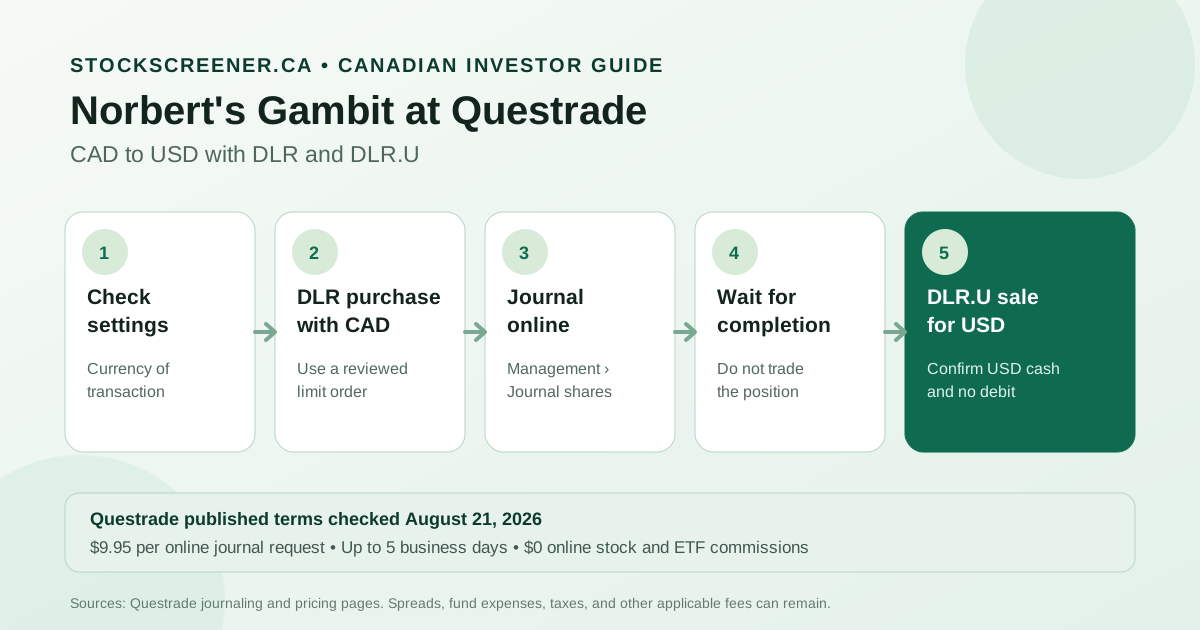
Answer first: Questrade's published CAD-to-USD workflow starts with a DLR purchase in Canadian dollars. The next steps are an online request under Management > Journal shares, a wait for completion, and a DLR.U sale for US-dollar proceeds. Questrade listed a $9.95 fee per online journal request and $0 online commissions for Canadian and US-listed stocks and ETFs when checked August 21, 2026. Bid-ask spreads, fund expenses, timing risk, and possible taxes still apply.
The setting that can undo the whole exercise is your registered account's currency settlement preference. If it is set to CAD, Questrade says USD proceeds can be converted back to CAD automatically overnight. Check that setting, both cash balances, and the exact ticker before placing the first order.
This guide covers Questrade's current self-directed workflow. For the mechanism without broker-specific screens, read the general Norbert's Gambit guide.
Norbert's Gambit versus Questrade's direct conversion
Details checked August 21, 2026. Questrade's published self-directed pricing showed a 1.5% currency-conversion fee, last updated November 18, 2023, a $9.95 online journal fee, and $0 commissions on online stock and ETF trades. These figures do not make the gambit free.
| Factor | Norbert's Gambit with DLR/DLR.U | Direct Questrade FX request |
|---|---|---|
| Published broker charge | $9.95 per online journal request; included at no added journal fee with Questrade Plus | 1.5% currency-conversion fee |
| Other costs | Bid-ask spread on each order, possible market or execution fees, and DLR fund expenses while held | Conversion fee is included in the exchange rate applied |
| Timing | Journal requests may take up to five business days, plus settlement for a recent purchase | Approved requests submitted before 2:30 p.m. ET are normally processed later that day; later requests are best efforts or next business day |
| Execution work | Two orders, one journal request, and balance checks | One exchange request |
| Main risk | Ticker, order-price, timing, settlement-setting, and tax-record errors | Paying the published percentage fee |
Pure fee arithmetic puts $9.95 equal to 1.5% of about $663. That is not a real break-even point. The gambit also incurs spread costs on both orders, ties up time, and creates a reportable disposition in a taxable account when the units are capital property. The practical threshold is personal and usually higher than the fixed-fee calculation suggests.
What's in this guide
| Pre-flight checks | Account setting, cash, ticker, and order type |
| CAD-to-USD steps | DLR purchase, online journal, and DLR.U sale |
| USD-to-CAD steps | The same route in reverse |
| Timing and costs | Settlement, spreads, fees, and uncertainty |
| Account-specific traps | Registered, RESP, margin, cash, and taxable accounts |
| Tax records and checklist | What to save and verify |
Four checks before a DLR purchase
Check the account and direction. For CAD to USD, the first order is DLR in Canadian dollars and the final order is DLR.U in US dollars. For USD to CAD, the order is reversed. Global X identifies both as units of its US Dollar Currency ETF with the same CUSIP, 379948102, traded on the Toronto Stock Exchange.
Check currency settlement. In a Questrade registered account, use Management, Account management, then Currency settlement. Questrade says “Currency of transaction” keeps proceeds in the currency of each trade. A CAD-only preference can automatically convert USD proceeds back to CAD overnight. A USD-only preference can convert Canadian-dollar proceeds to USD. Choose deliberately rather than assuming the current setting.
Check cash, not only buying power. A registered account cannot keep a negative CAD or USD balance overnight. Questrade says it reviews registered accounts for negative balances at 4 p.m. ET and may automatically convert the other currency to cover a deficit. In a margin account, an uncovered negative USD balance can instead become a loan that accrues interest. The gambit should not depend on borrowing that was not intended.
Check the live bid and ask. Global X's guide calls a limit order the industry-recommended practice and describes a two-cent spread as a general reference, not a guaranteed quote. Decide whether the actual spread and available size are acceptable. A market order gives up control over the worst execution price.
Step by step: CAD to USD at Questrade
- DLR purchase with settled CAD. The first leg uses the correct Questrade account and DLR on the Canadian-dollar side. The order review should show the TSX listing, quantity, limit price, estimated value, and CAD currency. The fill confirmation is part of the records to keep.
- Online journal request. After the fill, Questrade's path is Management, then Journal shares. The prompts identify the account and filled DLR position, and Questrade says the submitted request can be tracked in Request History.
- No trading during processing. Questrade explicitly says not to trade the investment while its journal request is processing. Seeing DLR or DLR.U in one screen does not establish that the back-office request is finished.
- DLR.U availability. The request should show as completed and the quantity should appear on the US-dollar side before the next trade. A recent DLR purchase needs settlement first. Questrade says that adds one business day from the trade date.
- DLR.U sale for USD. The final ticket should identify DLR.U and US-dollar proceeds. The live bid and ask, order type, and quantity need a fresh review. After the fill, the USD cash balance should be positive with no unwanted CAD or USD debit.
The journal and DLR.U sale are separate events. A US-listed purchase made on the assumption that the conversion is already complete can trigger a debit, forced conversion, or interest depending on the account.
USD to CAD uses DLR.U first
The reverse workflow starts with a DLR.U purchase using settled US dollars. An online request journals the equivalent units to DLR. After completion, a DLR sale produces Canadian-dollar proceeds. The final balance still depends on the account's settlement preference.
The journal fee is per request, not per unit. One direction normally needs one request. Breaking the same conversion into several journal requests can multiply the fixed charge. Partial fills can also complicate quantities, so confirm the filled number of units before requesting the journal.
Budget for the published maximum, not the best case
Questrade says online journal requests may take up to five business days. Its April 10, 2026 instructions also say that a recently purchased security adds one business day for settlement and give an example where the request itself takes another one or two business days. Holidays, account restrictions, or a rejected request can extend the practical timeline.
Canadian equities and ETFs have normally settled one business day after the trade since the Canadian market adopted T+1 on May 27, 2024. Questrade's journaling page is internally uneven on the final withdrawal step: it refers to one business day for a recent purchase but says to wait an additional two days after selling before withdrawing. Because the broker's own descriptions differ, rely on the actual settled-cash status in the account and confirm withdrawal availability if timing matters.
DLR is designed to reflect the US dollar's value in Canadian dollars, net of expenses. It reduces single-company price risk compared with using an interlisted stock, but it does not freeze the CAD/USD rate at the moment the first order fills. DLR's Canadian-dollar price can move with the exchange rate while the units are held. The ETF also reported a 0.57% MER and 0.01% trading expense ratio for the year ended December 31, 2025. Those annual fund costs are reflected in the fund, though a short holding period bears only a small fraction.
Account-specific traps matter more than the label
TFSA, RRSP, and FHSA: Questrade supports CAD and USD cash, but the settlement preference and no-negative-balance rule still apply. Norbert's Gambit changes cash currency inside the same account. It is not a contribution or withdrawal by itself. Moving money into or out of the registered account is a separate event subject to that account's rules.
RESP: Questrade says RESP journal requests are not available online and directs clients to support by phone or chat. A DLR purchase made before confirming assistance can leave the account without the expected self-service route.
Margin account: Questrade does not automatically convert currencies in the same way as a registered account. Buying a US security without enough USD can create a negative US-dollar balance and interest, even when the account holds CAD. Confirm the USD cash after the gambit before placing the next trade.
Cash account: Borrowing is not available, so an unintended foreign-currency purchase can prompt an automatic conversion. Keep enough cash in the order currency and inspect the ticket carefully.
Taxable account: The journal changes the displayed currency side, but the eventual ETF sale is still a disposition that requires Canadian-dollar records. The CRA says a capital gain or loss uses proceeds minus adjusted cost base and selling expenses. Foreign-currency proceeds, cost, and expenses must each be translated into Canadian dollars at the applicable transaction-date exchange rate. The Bank of Canada publishes daily indicative rates.
Save enough detail to reconstruct the conversion
Keep the DLR purchase confirmation, journal-request confirmation, completion notice, DLR.U sale confirmation, account statement, and the exchange-rate source used for tax records. In a taxable account, do not treat the USD amount alone as the proceeds or assume the broker's displayed book value is a complete adjusted-cost-base ledger.
Use this final check before considering the process complete:
- The original order filled under the intended account, ticker, price limit, and currency.
- The journal request shows the correct position, direction, quantity, and status.
- No trade touched the position while the request was processing.
- The final sale used DLR.U for USD or DLR for CAD, as intended.
- The target cash balance is positive and the other currency has no unintended debit.
- The registered-account settlement preference will not reverse the conversion overnight.
- Taxable-account records preserve Canadian-dollar cost and proceeds.
Converting currency for a US-listed ETF?
The FX method is only one part of the decision. Compare wrapper, withholding tax, account type, and simplicity before replacing a Canadian-listed ETF with a US-listed version.
Compare Canadian-listed and US-listed ETFsRelated reading
- Norbert's Gambit in Canada: the broker-neutral mechanics
- VFV vs VOO vs XEQT vs QQQ: exposure, currency, and account fit
- Foreign withholding tax in a TFSA, RRSP, and taxable account
- TFSA transfers in kind: direct transfers versus contributions
Frequently asked questions
How do I do Norbert's Gambit at Questrade?
For CAD to USD, Questrade's published workflow starts with a DLR purchase in Canadian dollars, followed by an online request under Management and Journal shares to convert the position to DLR.U. After the request is complete, a DLR.U sale produces US-dollar proceeds. Check the account's currency settlement preference and cash balances first.
How much does Questrade charge to journal shares?
Questrade listed a $9.95 flat fee per online journal request as of August 21, 2026. It listed unlimited journaling at no additional charge with Questrade Plus. Online stock and ETF trades were commission-free, but spreads and other applicable fees can remain.
How long does Norbert's Gambit take at Questrade?
Questrade says a journal request may take up to five business days. A recently purchased investment adds one business day for settlement. Processing can be faster, but do not rely on a best-case timeline.
Can I do Norbert's Gambit in a Questrade RESP?
Questrade says online journaling is not available for RESP accounts. It directs RESP holders to contact customer support by phone or chat for assistance.
Sources
- Questrade, Journaling shares, updated April 10, 2026 and checked August 21, 2026; online menu path, $9.95 request fee, Questrade Plus treatment, processing window, settlement note, no-trade warning, and RESP exception.
- Questrade, Trading fees and commissions, checked August 21, 2026; $0 online stock and ETF commissions, journaling price, and support for holding USD in registered accounts.
- Questrade, Self-directed transaction fees, checked August 21, 2026; 1.5% CAD/USD conversion fee, last updated November 18, 2023, and commission scope.
- Questrade, Currency settlement in registered accounts, checked August 21, 2026; currency-of-transaction setting, automatic conversions, negative balances, and exchange-request timing.
- Questrade, Exchanging funds in registered and non-registered accounts, updated June 2, 2025 and checked August 21, 2026; margin, cash, and registered-account currency behaviour.
- Global X Investments Canada, DLR product page, checked August 21, 2026; objective, CUSIP, eligible accounts, management fee, MER, TER, and CAD/USD unit-transfer feature.
- Global X Investments Canada, Canadian and US currency exposure using ETFs, checked August 21, 2026; DLR/DLR.U workflow, limit-order guidance, and spread reference.
- Canadian Investment Regulatory Organization, T+1 settlement amendments, effective May 27, 2024; the move to a one-business-day regular settlement cycle.
- Canada Revenue Agency, Calculating and reporting capital gains and losses, checked August 21, 2026; proceeds, adjusted cost base, expenses, records, and foreign-currency conversion rules.
- Bank of Canada, Daily exchange rates lookup, checked August 21, 2026; daily indicative exchange-rate data and publication timing.